- Pagina iniziale /
- Prodotti per l'ufficio /
- Elettronica per l'ufficio /
- Printers & Accessories /
- Computer Printers /
- Stampanti per computer a getto d'inchiostro /
- Ink Tank Printers /
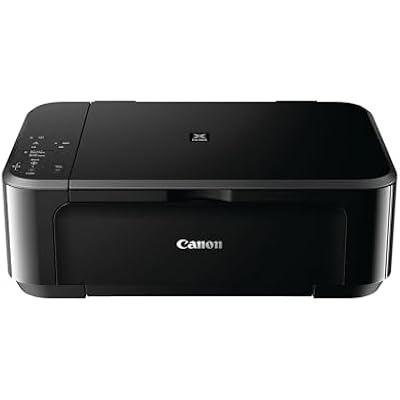
- Canon PIXMA MG MG3620 Inkjet Multifunction Pr...
0 ratings


Articolo #:
88002132
Canon PIXMA MG MG3620 Inkjet Multifunction Printer - Color
Articolo #:
88002132
ALL 17577
Price Details
Excluding Shipping & Custom charges ( Shipping and custom charges will be calculated on checkout )
*All items will import from Stati Uniti
0 ratings
Scrivi una recensione
In magazzino
 Importato dal negozio USA
QTY:
Ordina subito e indossalo Giovedì, Luglio 23
Secured transaction
Ubuy works hard to protect your security and privacy. Our advanced payment security system ensures confidentiality by encrypting your information during transmission using AES (Advanced Encryption Standards) and SSL (Secure Socket Layer) protocols. Your payment details are 100% secure as we do not share your payment details with third party sellers.
I nostri principali partner logistici


Print documents and web pages with fast speeds and vibrant colors.

Consegna
veloce

Reso
gratuito*

Imballaggio sicuro

Prodotti originali al 100%

Conformità PCI DSS

Certificazione ISO 27001


Note: Step Down Voltage Transformer required for using electronics products of Stati Uniti store (110-120). Recommended power converters Acquista ora.


Cosa salta all'occhio
Wireless Printing
Print from anywhere in your home or office using Wi-Fi connectivity, allowing for seamless operation with smartphones, tablets, and laptops without complicated setups.
Multifunctional Design
Combine printing, scanning, and copying in one compact machine, enhancing productivity and saving space while efficiently managing multiple tasks for home or small office use.
High-Quality Color
Produce vibrant, high-resolution prints with advanced ink technology, ensuring sharp text and stunning photos that meet professional standards, perfect for creative and everyday needs.
Dettagli del prodotto
| Item Weight | 11.7 lbs (5.31 kg) |
A chi è consigliato?

-
Home Users
Ideal for individuals needing occasional printing, scanning, and copying tasks for personal documents and photos.
-
Students
Perfect for students requiring reliable printing capabilities for essays, research papers, and study materials at home.
-
Small Offices
A cost-effective solution for small offices needing a multifunction printer for light printing, scanning, and copying tasks.

-
High Volume Printing
Not suitable for users needing to print large volumes of documents quickly due to slower print speeds.
-
Professional Photographers
May not meet the high-quality needs of professional photographers who require superior color accuracy and print quality.
-
Multi-User Environments
Less ideal for busy offices with multiple users requiring simultaneous printing due to limited connectivity options.
DESCRIZIONE DEL PRODOTTO
Canon PIXMA MG MG3620 Inkjet Multifunction Printer - Color
Hai qualche domanda? chatta con noi
Domande e risposte dei clienti
-
domanda:
What are the key features of the Canon PIXMA MG3620 Printer?
Rispondere: The Canon PIXMA MG3620 is a versatile wireless inkjet multifunction printer that offers printing, scanning, and copying capabilities. It supports mobile printing via AirPrint and Google Cloud Print, making it ideal for users who require flexibility in printing from various devices. Additionally, its compact design suits small spaces, while its color printing can produce vibrant documents and photos. This printer is perfect for home or small office use, accommodating diverse printing needs like school projects, photo prints, and everyday documents. -
domanda:
How do I connect the Canon PIXMA MG3620 to Wi-Fi?
Rispondere: To connect the Canon PIXMA MG3620 to Wi-Fi, use the built-in wireless setup utility located on the printer's control panel. Simply select your Wi-Fi network from the available list, enter the password, and the printer will connect. Once connected, download the Canon PRINT app on your smartphone to manage print jobs seamlessly. This wireless connection allows you to print from anywhere within your home network, making it convenient for multi-device households. -
domanda:
What types of paper can I use with the Canon PIXMA MG3620?
Rispondere: The Canon PIXMA MG3620 supports a variety of paper types including plain paper, photo paper (glossy and semi-glossy), and envelopes. You can use standard sizes like letter and A4, as well as custom sizes for your printing demands. These options allow for versatility, whether you're printing documents for work, crafting beautiful photo prints, or sending personalized notes. By choosing the right paper type, you can enhance the print quality and appearance of your projects. -
domanda:
Can I print photos directly from my smartphone using the MG3620?
Rispondere: Yes, you can print photos directly from your smartphone with the Canon PIXMA MG3620. With AirPrint for iOS devices and the Canon PRINT app for Android devices, you can easily select images from your photo gallery and send them to print wirelessly. This feature is particularly useful for preserving memories, allowing you to print professional-quality photos directly from your mobile devices without the need for a computer. -
domanda:
What ink cartridges are compatible with the Canon PIXMA MG3620?
Rispondere: The Canon PIXMA MG3620 uses two types of ink cartridges: the Canon PG-245 black ink cartridge and the CL-246 color ink cartridge. These cartridges are available in standard and XL sizes, providing options based on your print volume needs. Using original Canon cartridges ensures optimal print quality and performance, whether you’re printing lengthy documents or vivid photographs. Plus, purchasing XL cartridges can minimize the frequency of replacements for extensive printing tasks. -
domanda:
Does the Canon PIXMA MG3620 support duplex printing?
Rispondere: No, the Canon PIXMA MG3620 does not support automatic duplex printing. However, you can manually print on both sides by printing one side and reinserting the paper to print the other side. This method allows you to save paper, especially useful for projects that require multiple pages or documents that need to be double-sided for a professional appearance. -
domanda:
How can I troubleshoot printing issues with my MG3620?
Rispondere: If you experience printing issues with your Canon PIXMA MG3620, start by checking the printer's connection to your Wi-Fi and ensuring it is powered on. If the printer is not responding, restart both the printer and your computer or mobile device. Additionally, ensure there are no paper jams and that ink levels are sufficient. The printer's LCD panel can provide error messages that will guide you in resolving common issues quickly. Keeping the printer's software updated can also prevent technical glitches. -
domanda:
Is the Canon PIXMA MG3620 suitable for home office use?
Rispondere: Absolutely! The Canon PIXMA MG3620 is an excellent choice for home office use due to its multifunction capabilities, compact size, and wireless connectivity. It can efficiently handle various tasks such as printing invoices, scanning documents, and copying important papers. Its color printing capabilities make it suitable for producing high-quality presentations and reports, ensuring you maintain a professional appearance in all your printed materials. -
domanda:
How do I scan documents using the Canon PIXMA MG3620?
Rispondere: To scan documents using the Canon PIXMA MG3620, place the document face down on the scanner bed and initiate the scanning process via the printer's control panel or through the Canon PRINT app on your device. You can choose between scanning to a computer or sending it directly to email. The scanned files can be saved in various formats, allowing for easy sharing or storage. This feature is beneficial for digitizing important paperwork or creating backups of physical documents. -
domanda:
Where can I buy Canon PIXMA MG3620 Wireless Inkjet Multifunction Printer - Color?
Rispondere: You can buy the Canon PIXMA MG3620 Wireless Inkjet Multifunction Printer - Color from Ubuy in Albania. Ubuy offers a wide selection of electronic products, including printers, ensuring a reliable shopping experience with various options for customers.
Canon Ink Tank Printers Editorial Review
The reviews for this printer present a mixed but predominantly favorable user experience, showcasing its utility and functionality, particularly for users with specific needs such as connecting via USB. Customers appreciate its compatibility with Chromebooks, highlighting the convenience of immediate recognition by the system without requiring additional software downloads. Several users specifically note the printer's satisfactory performance for home printing tasks, reinforcing its appeal for everyday use. However, the feedback is not without criticism. Print quality has drawn concern, particularly for black-and-white outputs, which some users describe as subpar—characterized by blurriness and smearing. Moreover, the printer's mechanical sounds before and after printing have raised alarms for some users regarding its durability. Limitations in wireless connectivity are another recurring theme, with several customers pointing out that the wireless range is quite restricted, often necessitating a USB connection instead. On the whole, this printer serves as a practical solution for users looking for a straightforward, budget-friendly printing option, especially in environments where wireless networking is not a primary Consideration. While there are warnings regarding its print quality and setup challenges, many users find it to live up to expectations for basic home printing needs. **
Recensioni e valutazioni del cliente
1 valutazioni dei clienti
-
5 stella
100%
-
4 stella
0%
-
3 stella
0%
-
2 stella
0%
-
1 stella
0%
Recensisci questo prodotto
Condividi le tue impressioni con altri clienti
Professionisti
- Easy setup and immediate recognition by devices (especially Chromebooks).
- Affordable and generally offers good print quality for basic home tasks.
- Portable and convenient for travel usage.
Contro
- Mechanical noises during operation raise durability concerns.
Cronologia dei prezzi del prodotto
Informazioni importanti
- Limitazioni: per i prodotti spediti a livello internazionale, si prega di notare che ogni garanzia del produttore potrebbe non essere valida, le opzioni di assistenza del produttore potrebbero non essere disponibili, i manuali del prodotto, le istruzioni e gli avvisi di sicurezza potrebbero non essere nella lingua del paese di destinazione. I prodotti (e i materiali di accompagnamento) potrebbero non essere progettati in conformità con gli standard, le specifiche e i requisiti di etichettatura del paese di destinazione e i prodotti potrebbero non essere conformi alla tensione di rete del paese di destinazione e ad altri standard elettrici (richiedendo l'uso di un adattatore o di un trasformatore, se necessario). Il destinatario è responsabile di assicurare che il prodotto possa essere legalmente importato nel paese di destinazione. Quando si ordina da Ubuy o dai suoi affiliati, il destinatario è l'importatore registrato ed è tenuto a rispettare tutte le leggi e i regolamenti del paese di destinazione.
- Non tutti i prodotti elencati su Ubuy sono in vendita, poiché Ubuy è un motore di ricerca globale. I prodotti sono soggetti a regolamenti di esportazione/commercio.
ALL 17577
Ordina subito e indossalo Giovedì, Luglio 23
Questo articolo non è vietato nel mio paese. (Fai clic sul link se questo articolo non è vietato nel tuo paese. In questo modo, il nostro team verificherà il permesso).
QTY:
Secured transaction
Ubuy works hard to protect your security and privacy. Our advanced payment security system ensures confidentiality by encrypting your information during transmission using AES (Advanced Encryption Standards) and SSL (Secure Socket Layer) protocols. Your payment details are 100% secure as we do not share your payment details with third party sellers.
I nostri principali partner logistici
Consegna transfrontaliera più veloce
Caratteristiche e benefici
- Combines dye ink for vivid colors with black pigment ink for sharp text.
- Delivers fast printing speeds for efficient document handling.
- Patented printhead technology fires ink droplets as small as 2pl.
- Achieves maximum color resolution of 4800 x 1200 dpi.
- Ideal for both home and office environments.
- Built-in wireless capability for easy connectivity.