- Pagina iniziale /
- Prodotti per l'ufficio /
- Elettronica per ufficio /
- Stampanti e accessori /
- Stampanti /
- Stampanti laser /
- Epson Workforce Pro WF-C4810 Inkjet Multifunc...
0 ratings




Articolo #:
71733718
Epson Workforce Pro WF-C4810 Inkjet Multifunction Printer - Color
79% degli intervistati lo consiglierebbe a un amico
 1 Sustainability Highlights
Articolo #:
71733718
ALL 38954
Dettagli del prezzo
Escluse spese di spedizione e doganali ( Le spese di spedizione e doganali saranno calcolate al momento del pagamento )
*Tutti gli articoli verranno importati da Stati Uniti
0 ratings
Scrivi una recensione
Disponibile
 Importato dal negozio USA
Qtà:
Solo 18 articoli rimasti in magazzino.
Ordina subito e ricevilo entro Giovedì, Ottobre 15
Transazione sicura
Ubuy works hard to protect your security and privacy. Our advanced payment security system ensures confidentiality by encrypting your information during transmission using AES (Advanced Encryption Standards) and SSL (Secure Socket Layer) protocols. Your payment details are 100% secure as we do not share your payment details with third party sellers.
I nostri principali partner logistici


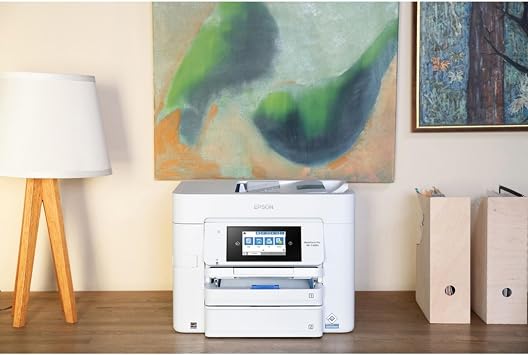
The Epson Workforce WF-C4810 Color Inkjet Multifunction Printer is designed for reliability and reduced downtime in fast-paced environments with the lowest power consumption. It provides high volume printing, duplex solution, and built-in copy, scan and fax features.

Consegna
veloce

Reso
gratuito*

Imballaggio sicuro

Prodotti originali al 100%

Conformità PCI DSS

Certificazione ISO 27001



Note: Step Down Voltage Transformer required for using electronics products of Stati Uniti store (110-120). Recommended power converters Acquista ora.


Cosa salta all'occhio
High-Quality Output
Delivers vibrant color prints and sharp text using advanced PrecisionCore technology, ensuring professional-quality results for both documents and presentations.
Fast Performance
Prints up to 25 pages per minute, significantly enhancing productivity for busy workplaces and reducing waiting time compared to traditional printers.
Cost-Effective Ink
Utilizes high-capacity ink cartridges that lower printing costs per page, making it an economical choice for small to medium-sized businesses focused on budget-friendly operations.
Dettagli del prodotto
- Designed for reliability and reduced downtime in fast-paced environments
- Lowest power consumption in its class with PrecisionCore Heat-Free Technology
- Includes a 50-sheet auto document feeder for easy multitasking
- Auto 2-sided printing, copy, scan, and fax for seamless workflow
- Epson ScanSmart allows for easy scanning and editing with a user-friendly interface
- Supports latest wireless connectivity with WPA3 security and convenient setup
| Printer Type | Inkjet |
| Other Special Features of the Product | Auto Document Feeder |
| Printer Output Type | Color |
| Controller Type | Android |
| Print media | Paper (plain) |
| Scanner Type | Sheetfed |
| Compatible Devices | Smartphones |
| Ink Color | cyan, magenta, yellow, black |
| Additional Printer Functions | All In One |
| Control Method | App |
| Number of Trays | 2 |
| Color Pages per Minute | 12 pages_per_minute |
| Maximum Media Size | 8.3 x 11.7 inch |
| Maximum Sheet Capacity | 50 |
| Duplex | auto |
| Brand | Epson |
| Model Name | WF-C4810 |
| Model Number | WF-C4810 |
| Built-In Media | Information Not Available |
| Model Series | Workforce Pro |
| UPC | 010343968226 |
| Unit Count | 1 Count |
| Manufacturer | EPSON - SUPERTANK PRINTERS AND INK |
| Color | Information Not Available |
| Printer Connectivity Type | Wireless |
| Hardware Interface | Ethernet |
| Connectivity Technology | Wireless |
| Printing Technology | Inkjet |
| Special Feature | Auto Document Feeder |
| Printer Output | Color |
| Maximum Print Speed (Color) | 12 pages_per_minute |
| Item Weight | 37 lbs (16.78 kg) |
Cosa c'è nella confezione
Information Not Available
A chi è consigliato?

-
Small Businesses
Ideal for small businesses needing efficient printing, scanning, and copying with high-quality output and low operating costs.
-
Remote Workers
Great for remote workers who require versatile functionality, enabling seamless handling of various document tasks from home.
-
Creative Teams
Suitable for creative teams that demand vivid color prints for presentations and designs, ensuring professional-level quality.

-
Heavy Duty Users
Not suitable for users with extremely high-volume printing needs, as inkjet may require more frequent replacements.
DESCRIZIONE DEL PRODOTTO
About This Item
Upgrade your workflow and boost your productivity with the Epson Workforce WF-C4810 Color Inkjet Multifunction Printer. This advanced printer is specifically designed for fast-paced, heavy-workload environments, making it the perfect choice for businesses looking to streamline their operations. Thanks to its PrecisionCore Heat-Free Technology, this printer has the lowest power consumption in its class. Not only does this save you money on energy bills, but it also reduces downtime and ensures uninterrupted printing.
With impressive printing speeds of 25 black/12 color ISO ppm, you can rely on this printer to deliver high-quality, high-volume prints in no time. The WF-C4810 is a complete duplex solution, offering auto 2-sided printing, as well as built-in copy, scan, and fax capabilities. With its 50-sheet Auto Document Feeder, you can quickly and conveniently accomplish a variety of tasks without any hassle. Plus, the large 500-sheet paper capacity allows you to handle large printing jobs without constant paper refills. One of the standout features of this printer is the vivid DURABrite Ultra inks, which ensure professional-quality prints with sharp and vibrant colors.
Whether you're printing documents, marketing materials, or photos, you can trust that your prints will always look impressive. Navigating and controlling the printer is a breeze, thanks to the 4.3-inch color touchscreen. It provides a user-friendly interface for easy navigation and control. Additionally, the Epson Smart Panel App allows for enhanced connectivity and productivity when using your mobile device. Setting up this printer is quick and convenient, thanks to its latest wireless connectivity options.
It supports WPA3, the latest wireless security protocol, ensuring robust authentication and cutting-edge security. Whether you prefer Bluetooth Low Energy (BLE), built-in wireless, Wi-Fi Direct, or Ethernet networking, this printer has got you covered. Don't let a slow and inefficient printer hold you back. Invest in the Epson Workforce WF-C4810 Color Inkjet Multifunction Printer and experience the difference it can make in your business.
Shop now and enjoy the benefits of enhanced productivity, professional-quality prints, and seamless connectivity.
Sustainability Highlights
This product has sustainability features recognized by trusted certifications.
Energy efficiency
Conserves energy compared to similar products. As certified by
Products that earn the U.S. Environmental Protection Agency’s ENERGY STAR label are independently certified to use less energy than standard models, reducing carbon pollution associated with energy generation and lowering your energy bill. For more information, visit energystar.gov. Learn more about this certification
Hai qualche domanda? chatta con noi
Domande e risposte dei clienti
-
Domanda:
What are the main features of the Epson Workforce Pro WF-C4810?
Risposta: The Epson Workforce Pro WF-C4810 is a versatile inkjet multifunction printer that offers printing, scanning, copying, and faxing capabilities. It supports automatic duplex printing and is equipped with a high-capacity ink system, ensuring a lower cost per page. This model is engineered for high productivity, making it suitable for small to medium-sized businesses. With its robust paper handling and connectivity options including Wi-Fi and Ethernet, it seamlessly integrates into any office setup, providing reliable and efficient operation for a range of tasks. -
Domanda:
Can the Epson Workforce Pro WF-C4810 print wirelessly?
Risposta: Yes, the Epson Workforce Pro WF-C4810 supports wireless printing, enabling users to print documents directly from their smartphones, tablets, or laptops via Wi-Fi. This feature enhances convenience in a busy office environment, allowing multiple devices to connect to the printer without the need for cumbersome cables. Users can take advantage of Epson's mobile printing applications to manage print jobs from virtually anywhere, making it perfect for remote work or collaborative projects. -
Domanda:
What type of paper does the Epson Workforce Pro WF-C4810 support?
Risposta: The Epson Workforce Pro WF-C4810 supports various paper types including plain paper, premium glossy photo paper, and recycled paper. It can handle different paper sizes ranging from letter and legal to envelopes and custom sizes. This flexibility makes it ideal for diverse printing needs, whether you are producing professional presentations, marketing materials, or everyday documents. Users can easily switch between paper types, allowing for streamlined workflows in varied printing scenarios. -
Domanda:
What are the printing speeds of the Epson Workforce Pro WF-C4810?
Risposta: The Epson Workforce Pro WF-C4810 offers impressive printing speeds, capable of reaching up to 25 pages per minute for black and color documents. This high-speed performance assists businesses in managing large volumes of work efficiently, significantly reducing time spent on printing tasks. It is especially beneficial for high-demand environments where fast turnaround on print jobs is essential, such as in busy offices or during peak periods. -
Domanda:
Is the Epson Workforce Pro WF-C4810 compatible with third-party ink cartridges?
Risposta: While the Epson Workforce Pro WF-C4810 is designed to work optimally with Epson's genuine ink cartridges, some users opt for third-party cartridges. However, it is important to consider that using non-Epson inks may affect print quality and performance. For best results and to ensure that the printer maintains its efficiency and coloration standards, sticking with original Epson cartridges is recommended. This ensures superior quality in documents and longevity in printer performance. -
Domanda:
Does the Epson Workforce Pro WF-C4810 have a scanner function?
Risposta: Yes, the Epson Workforce Pro WF-C4810 includes a high-quality scanner that supports both color and monochrome scanning. It features an automatic document feeder, allowing users to scan multi-page documents quickly and efficiently. This scanning capability enhances productivity in environments that require frequent document digitization, such as offices needing to archive important paperwork or share information electronically. -
Domanda:
What connectivity options are available on the Epson Workforce Pro WF-C4810?
Risposta: The Epson Workforce Pro WF-C4810 offers a variety of connectivity options. It provides Wi-Fi, Ethernet, and USB connections for versatile integration into any office network. Users can easily connect to their home or office network for seamless printing. Additionally, it supports mobile printing through Apple AirPrint, Google Cloud Print, and other third-party apps, making it a flexible choice for users who value convenience and accessibility. -
Domanda:
What is the print resolution of the Epson Workforce Pro WF-C4810?
Risposta: The Epson Workforce Pro WF-C4810 boasts an impressive print resolution of up to 4800 x 1200 optimized dpi. This high resolution ensures that printed documents, presentations, and images are sharp and vibrant, conveying professionalism and clarity. Such quality is particularly advantageous for creative projects or marketing materials where visual fidelity is critical, allowing businesses to present their work in the best light possible. -
Domanda:
How do I set up the Epson Workforce Pro WF-C4810?
Risposta: Setting up the Epson Workforce Pro WF-C4810 requires following a few straightforward steps. After unboxing the printer, connect it to a power source and turn it on. Install the ink cartridges and load paper into the tray. Follow the on-screen instructions for connecting to Wi-Fi or a wired network. The user manual provides detailed guidance to ensure a smooth setup process. This ease of installation allows you to efficiently start printing without extensive technical knowledge, making it user-friendly for all. -
Domanda:
Where can I buy the Epson Workforce Pro WF-C4810 in Albania?
Risposta: You can buy the Epson Workforce Pro WF-C4810 Inkjet Multifunction Printer from Ubuy in Albania. Ubuy offers a wide selection of printers, including this highly-rated model, ensuring you have access to quality products for your printing needs. With their reliable service and range of options, Ubuy is a great platform to consider when making your purchase.
Epson Laser Printers WF-C4810 Editorial Review
The Epson Workforce Pro WF-C4810 Inkjet Multifunction Printer offers impressive features for both home and office settings, including an auto document feeder and wireless connectivity, allowing for seamless printing, scanning, and copying tasks. With a print speed of up to 12 color pages per minute, this device ensures efficiency in any workspace. Users appreciate its compatibility with smartphones, making it convenient to print from mobile devices. This printer is designed to handle various media sizes up to 8.3 x 11.7 inches and boasts a 50-sheet capacity, making it a reliable choice for those needing consistent and high-quality output.
Recensioni e valutazioni dei clienti
7 valutazioni dei clienti
-
5 stella
47%
-
4 stella
29%
-
3 stella
0%
-
2 stella
0%
-
1 stella
24%
Recensisci questo prodotto
Condividi le tue impressioni con altri clienti
Vantaggi
- Auto Document Feeder enhances productivity
- Wireless connectivity for easy printing
- Compatible with smartphones for convenience
- High-quality color printing
- Suitable for various media sizes
Contro
- Heavier than some competing models
Affidabilità della piattaforma e fiducia degli acquirenti

JK
Jasmin
Acquirente verificato
“Great products and very good service: very easy and very fast international delivery.”
9 September 2026 · via Trustpilot
AG
Anke
Acquirente verificato
“Wonderful online shopping experience, smooth transaction from the start. Payment method works conveniently and delivery is unexpectedly fast and reliable. You go the extra mile for service. What makes this even more amazing, you deliver to Namibia. I will remain a happy Ubuy customer and will increase my purchases for sure! Thank you!”
10 September 2026 · via Trustpilot
H
Hazel
Acquirente verificato
“Very easy to find the products what you need, and so fast delivery, that’s why I highly recommended to others costumers to used ubuy.”
10 September 2026 · via Trustpilot
O
Opaleye
Acquirente verificato
“I received exactly what I ordered I was skeptical about your site because that was my first time to order. But the order came timely and neatly packaged. I was not disappointed. Thank you.”
11 September 2026 · via Trustpilot
AC
Adele
Acquirente verificato
“Easy to find and order what you want on the website. Delivery is quick to the UK”
8 September 2026 · via Trustpilot
Pagamento sicuro
Consegna in tutto il mondo
Resi facili
Prodotti originali
Cronologia dei prezzi del prodotto
Informazioni importanti
- Limitazioni: per i prodotti spediti a livello internazionale, si prega di notare che ogni garanzia del produttore potrebbe non essere valida, le opzioni di assistenza del produttore potrebbero non essere disponibili, i manuali del prodotto, le istruzioni e gli avvisi di sicurezza potrebbero non essere nella lingua del paese di destinazione. I prodotti (e i materiali di accompagnamento) potrebbero non essere progettati in conformità con gli standard, le specifiche e i requisiti di etichettatura del paese di destinazione e i prodotti potrebbero non essere conformi alla tensione di rete del paese di destinazione e ad altri standard elettrici (richiedendo l'uso di un adattatore o di un trasformatore, se necessario). Il destinatario è responsabile di assicurare che il prodotto possa essere legalmente importato nel paese di destinazione. Quando si ordina da Ubuy o dai suoi affiliati, il destinatario è l'importatore registrato ed è tenuto a rispettare tutte le leggi e i regolamenti del paese di destinazione.
- Non tutti i prodotti elencati su Ubuy sono in vendita, poiché Ubuy è un motore di ricerca globale. I prodotti sono soggetti a regolamenti di esportazione/commercio.
ALL 38954
Ordina subito e ricevilo entro Giovedì, Ottobre 15
Questo articolo non è vietato nel mio Paese. (Se l'articolo non è vietato nel tuo Paese, fai clic sul link: il nostro team verificherà l'autorizzazione.)
Qtà:
Solo 18 articoli rimasti in magazzino.
Transazione sicura
Conforme allo standard PCI DSS e certificato ISO 27001:2022, con pagamenti crittografati e piena protezione dell'acquirente su ogni ordine.
I nostri principali partner logistici
Consegna transfrontaliera più rapida
Caratteristiche e benefici
- Fast Paced: Designed for reliability and reduced downtime, the WorkForce Pro WF-C4810 is right at home in fast-paced.
- Lowest Consumption: It has the lowest power consumption in its class, thanks to state-of-the-art PrecisionCore Heat-Free Technology.
- Feeder: 50-sheet auto document feeder to quickly and conveniently accomplish a variety of tasks.
- Multi-Tasking: The WF-C4810 keeps things moving with auto 2-sided printing and built-in copy, scan and fax.
- User Friendly: Epson ScanSmart supports easy scanning and editing with a modern, user-friendly interface.
Garanzia Ubuy
Vivi un'esperienza di shopping senza pensieri con prodotti 100% originali, sicurezza dei pagamenti conforme allo standard PCI DSS, protezione dei dati certificata ISO 27001, la consegna internazionale più rapida, resi gratuiti, e imballaggio sicuro su ogni ordine.*