0 ratings


Articolo #:
69355953
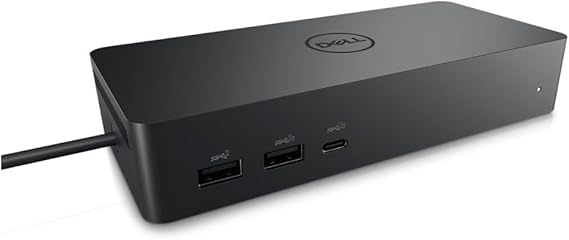
Dell DELL-UD22 UD22 Universal Dock, Black
89% degli intervistati lo consiglierebbe a un amico
Articolo #:
69355953
ALL 20878
Dettagli del prezzo
Escluse spese di spedizione e doganali ( Le spese di spedizione e doganali saranno calcolate al momento del pagamento )
*Tutti gli articoli verranno importati da Stati Uniti
0 ratings
Scrivi una recensione
Disponibile
 Importato dal negozio USA
Ordina subito e ricevilo entro Monday, Settembre 21
Transazione sicura
Ubuy works hard to protect your security and privacy. Our advanced payment security system ensures confidentiality by encrypting your information during transmission using AES (Advanced Encryption Standards) and SSL (Secure Socket Layer) protocols. Your payment details are 100% secure as we do not share your payment details with third party sellers.
I nostri principali partner logistici


Create a productive workstation with increased flexibility

Consegna
veloce

Reso
gratuito*

Imballaggio sicuro

Prodotti originali al 100%

Conformità PCI DSS

Certificazione ISO 27001



Note: Step Down Voltage Transformer required for using electronics products of Stati Uniti store (110-120). Recommended power converters Acquista ora.


Cosa salta all'occhio
Versatile Connectivity
The Dell Universal Dock UD22 supports multiple device connections, offering HDMI, USB-C, and Ethernet ports, enabling seamless integration with various laptops and peripherals for enhanced productivity.
High-Resolution Support
This dock provides dual 4K display capabilities, ensuring high-resolution performance for graphic-intensive tasks, ideal for professional users seeking superior visual experiences without compromising on speed.
Compact Design
The sleek and compact form factor of the UD22 ensures efficient desk space usage, appealing to users in home offices or collaborative workspaces who value aesthetics alongside functionality.
Dettagli del prodotto
| Hardware Interface | HDMI, USB 3.0 Type A |
| Compatible Devices | Monitors |
| Total Usb Ports | 6 |
| Number of Ports | 10 |
| Total Number of HDMI Ports | 1 |
| Wattage | 130 |
| Item Dimensions L x W x H | 6.54"L x 1.26"W x 2.99"H (16.6 x 3.2 x 7.6 cm) |
| Item Weight | 14.7 ounces (416.75 grams) |
| Color | Black |
| Brand | Dell |
| Number of Items | 1 |
| Number of Packs | 1 |
| Unit Count | 1 Count |
| UPC | 884116431442 |
| Manufacturer | Dell Computers |
| Built-In Media | Item |
| Model Number | Dell-UD22 |
| Mfr Part Number | 210-BEXR |
| Total USB Ports | 6 |
| Product Dimensions (L x W x H) | 6.54"L x 1.26"W x 2.99"H (16.6 x 3.2 x 7.6 cm) |
| Total HDMI Ports | 1 |
A chi è consigliato?

-
Remote Workers
Ideal for remote workers needing multiple connections for monitors and peripherals, enhancing productivity and workspace organization.
-
Gamers
Great for gamers who require multiple display options and peripheral connectivity for an immersive gaming experience.
-
Content Creators
Perfect for content creators who need to connect various devices and displays for multitasking during editing and production.

-
Minimalists
Not suitable for users who prefer a minimal setup, as it adds multiple connections and devices to their workspace.
DESCRIZIONE DEL PRODOTTO
Dell DELL-UD22 UD22 Universal Dock, Black
Hai qualche domanda? chatta con noi
Domande e risposte dei clienti
-
Domanda:
What devices are compatible with the Dell Universal Dock UD22?
Risposta: The Dell Universal Dock UD22 is compatible with a wide range of devices including Dell laptops, as well as other brands supporting USB-C and Thunderbolt 3 connections. It is particularly beneficial for users with ultrabooks and 2-in-1 devices. This dock provides multiple ports, including HDMI, DisplayPort, and USB-A, which makes it a versatile accessory for both home and office setups, allowing for a seamless connection to external monitors, peripherals, and network systems. -
Domanda:
How do I set up the Dell Universal Dock UD22?
Risposta: Setting up the Dell Universal Dock UD22 is straightforward and requires just a few simple steps. Start by connecting the dock to a power source, then connect your laptop using a USB-C or Thunderbolt 3 cable. Afterward, plug in your monitors and peripherals to the appropriate ports on the dock. The dock usually auto-configures itself, making it easy to extend your display or connect additional devices without any complicated setup. This is especially helpful for multitasking professionals who need a stable and efficient workspace. -
Domanda:
Can I use multiple monitors with the Dell Universal Dock UD22?
Risposta: Yes, the Dell Universal Dock UD22 supports multiple monitor setups. Thanks to its array of video outputs, you can connect two external displays simultaneously via HDMI and DisplayPort. This is ideal for users who require enhanced productivity and wish to work on multiple applications side by side. For instance, graphic designers or data analysts can benefit significantly from expanded screen real estate, allowing for easier access to tools and documents. -
Domanda:
Does the Dell Universal Dock UD22 provide power delivery to laptops?
Risposta: Absolutely, the Dell Universal Dock UD22 offers power delivery capabilities, enabling it to charge your connected laptop while in use. This feature eliminates the need for multiple chargers and helps keep your workspace tidy. Users with high-performance laptops will find this particularly advantageous as it allows for uninterrupted usage, especially during intensive tasks like video editing or gaming. You can stay productive without worrying about battery life. -
Domanda:
Is the Dell Universal Dock UD22 suitable for gaming?
Risposta: While the Dell Universal Dock UD22 is primarily designed for office and productivity use, it can also be used for gaming, particularly with laptops that support gaming graphics. Users can connect their devices to a monitor for improved graphics display and performance. However, keep in mind that performance might vary based on your laptop's hardware capabilities; it works best when paired with devices that have robust processing power and high-refresh-rate monitors. -
Domanda:
What type of cables are included with the Dell Universal Dock UD22?
Risposta: The Dell Universal Dock UD22 generally comes with a power adapter and a USB-C cable. These components are essential for connecting the dock to your laptop and powering it properly. Depending on the package, you may also need to use additional cables for connecting your monitors or peripherals. Users often find that having extra HDMI or DisplayPort cables on hand can enhance their connectivity options, ensuring they can set up their workspace as they prefer. -
Domanda:
How does the Dell Universal Dock UD22 enhance my productivity?
Risposta: The Dell Universal Dock UD22 significantly enhances productivity by allowing multiple connections simultaneously, transforming your laptop into a comprehensive workstation. With its various ports for displays, USB devices, and networking, you can work with multiple screens and tools. For instance, professionals who deal with large spreadsheets or design software can efficiently manage their work environment, thereby streamlining workflows and minimizing time wasted on switching between applications. -
Domanda:
Can I use the Dell Universal Dock UD22 with an older laptop model?
Risposta: Yes, the Dell Universal Dock UD22 can be used with older laptops, provided they have compatible ports, such as USB-C or Thunderbolt 3 connections. If your older laptop does not support these ports, alternative methods like USB-A adapters can sometimes facilitate connection, though functionality may be limited compared to newer models. This adaptability makes the dock a versatile choice for users transitioning from older to newer laptops or those with mixed tech environments. -
Domanda:
What are the dimensions of the Dell Universal Dock UD22?
Risposta: The Dell Universal Dock UD22 typically has compact dimensions that make it easy to fit into any workspace without clutter. It is designed to occupy minimal desk space while providing extensive connectivity options. This is particularly important for users who may have limited desk space or need to frequently rearrange their work environment. With its sleek design, it complements both home offices and formal office settings seamlessly. -
Domanda:
Where can I buy Dell Universal Dock UD22 Black in Albania?
Risposta: You can purchase the Dell Universal Dock UD22 Black from Ubuy, a reliable online retailer that offers a wide selection of electronic products. Ubuy frequently provides detailed product descriptions and user reviews, making it easier for you to make an informed purchasing decision. Plus, with various shipping options, Ubuy ensures that you can conveniently obtain your ideal tech accessories from the comfort of your home.
Dell Docking Stations Dell-UD22 Editorial Review
Nessuna recensione editoriale trovata
Recensioni e valutazioni dei clienti
1 valutazioni dei clienti
-
5 stella
100%
-
4 stella
0%
-
3 stella
0%
-
2 stella
0%
-
1 stella
0%
Recensisci questo prodotto
Condividi le tue impressioni con altri clienti
Affidabilità della piattaforma e fiducia degli acquirenti

JK
Jasmin
Acquirente verificato
“Great products and very good service: very easy and very fast international delivery.”
9 September 2026 · via Trustpilot
AG
Anke
Acquirente verificato
“Wonderful online shopping experience, smooth transaction from the start. Payment method works conveniently and delivery is unexpectedly fast and reliable. You go the extra mile for service. What makes this even more amazing, you deliver to Namibia. I will remain a happy Ubuy customer and will increase my purchases for sure! Thank you!”
10 September 2026 · via Trustpilot
H
Hazel
Acquirente verificato
“Very easy to find the products what you need, and so fast delivery, that’s why I highly recommended to others costumers to used ubuy.”
10 September 2026 · via Trustpilot
O
Opaleye
Acquirente verificato
“I received exactly what I ordered I was skeptical about your site because that was my first time to order. But the order came timely and neatly packaged. I was not disappointed. Thank you.”
11 September 2026 · via Trustpilot
AC
Adele
Acquirente verificato
“Easy to find and order what you want on the website. Delivery is quick to the UK”
8 September 2026 · via Trustpilot
Pagamento sicuro
Consegna in tutto il mondo
Resi facili
Prodotti originali
Cronologia dei prezzi del prodotto
Informazioni importanti
- Limitazioni: per i prodotti spediti a livello internazionale, si prega di notare che ogni garanzia del produttore potrebbe non essere valida, le opzioni di assistenza del produttore potrebbero non essere disponibili, i manuali del prodotto, le istruzioni e gli avvisi di sicurezza potrebbero non essere nella lingua del paese di destinazione. I prodotti (e i materiali di accompagnamento) potrebbero non essere progettati in conformità con gli standard, le specifiche e i requisiti di etichettatura del paese di destinazione e i prodotti potrebbero non essere conformi alla tensione di rete del paese di destinazione e ad altri standard elettrici (richiedendo l'uso di un adattatore o di un trasformatore, se necessario). Il destinatario è responsabile di assicurare che il prodotto possa essere legalmente importato nel paese di destinazione. Quando si ordina da Ubuy o dai suoi affiliati, il destinatario è l'importatore registrato ed è tenuto a rispettare tutte le leggi e i regolamenti del paese di destinazione.
- Non tutti i prodotti elencati su Ubuy sono in vendita, poiché Ubuy è un motore di ricerca globale. I prodotti sono soggetti a regolamenti di esportazione/commercio.
ALL 20878
Ordina subito e ricevilo entro Monday, Settembre 21
Questo articolo non è vietato nel mio Paese. (Se l'articolo non è vietato nel tuo Paese, fai clic sul link: il nostro team verificherà l'autorizzazione.)
Qtà:
Transazione sicura
Conforme allo standard PCI DSS e certificato ISO 27001:2022, con pagamenti crittografati e piena protezione dell'acquirente su ogni ordine.
I nostri principali partner logistici
Consegna transfrontaliera più rapida
Caratteristiche e benefici
- Dell Universal Dock UD22 supports consistent display across systems
- It has the highest number of ports on a universal dock
Garanzia Ubuy
Vivi un'esperienza di shopping senza pensieri con prodotti 100% originali, sicurezza dei pagamenti conforme allo standard PCI DSS, protezione dei dati certificata ISO 27001, la consegna internazionale più rapida, resi gratuiti, e imballaggio sicuro su ogni ordine.*